Now a days number of Linux users are growing due to its powerful features. Most of the user’s are comfortable with windows OS because of its GUI feature.Some times they think that Linux difficult to understand and operate. But it’s not like that both are operating system are easy to understand.So those who want to learn Linux and want to understand Linux technology ,this blog will help you to improve your skills and knowledge. Let’s start the first part that how we can learn in just five days….
First up all for learning and understanding any software or any technology we require the environment a proper environment. Similarly to understand Linux we need to install Linux OS on your system or computer. You can install Linux on hard drive or virtually that is on virtual box.
There are so many flavours of Linux,you can used any flavour but I have used Fedora so I am providing link of it.
If want to install Fedora operating system here is link install of Fedora installation.
Here is detail guide of installation steps.After successful installation start your OS and let’s begin the practice with Linux.
Day 1: Linux architecture and its directory structure.
Linux Architecture:
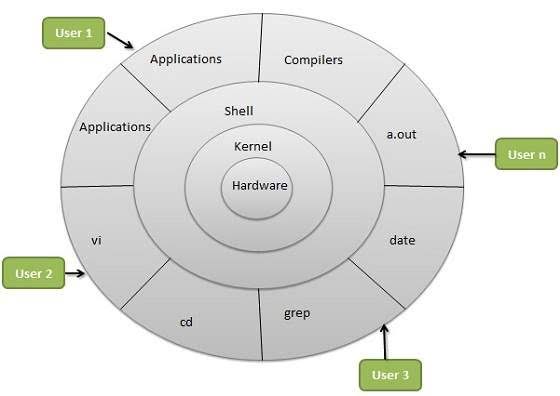
Above fig shows the basic Linux architecture. It contains four layers. The hardware comes at lowest which is our computer hardware,mother board,etc. The above this layer Linux kernel is located. The kernel is responsible for to start operating system and schedule the CPU process. The next layer is shell which is most important part of this architecture. It is interpreter between hardware and user. It takes commands given by user and give output to user by using shell. The finally comes user which operates the computer and do his job.So this simple architecture.
Linux directory structure :
Linux operating system has hierarchical directory structure which starts from / called root directory.The hierarchical structure shown below
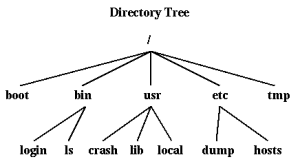
- / – this root directory is located at the top. Note this directory is not related to root superuser.
- /bin – it contains binary files and other executable programs.
- /boot – This directory contains files required to boot system.
- /etc – It contains system configuration files.
- /dev- device files which is controlled by operating system and system administrator.
- /tmp – Temporary directory which cleared on reboot.
- /var- Variables data and log files.
- /usr – User related data.
“In next post,you will learn about File permission and how to create and edit files”
 Tech Linux